Skip to content
Brad Dworkin

Technical product portfolio

A closer look at the systems.

I design and build working software with AI-assisted development. These projects show product decisions in code, with paid work, private systems, and prototypes identified separately. Start with the system closest to your team.

Flagship systems

Featured systems.

Each project shows a different kind of product depth: agent operations, real-world delivery, spatial product invention, or enterprise workflow design.

  1. F01

    Private system

    Mercedes / OpenClaw

    Agent orchestration · local and cloud models · Discord

    A conversation about design

    1. Brad avatar

      Brad5:07 PM

      Need to work on my design skill with you

    2. Mercedes avatar

      MercedesAI5:07 PM

      Good. Let’s make it practical: bring me something you’re designing, even half-formed, and we’ll work through hierarchy, layout, typography, interaction, and taste together. I’ll critique the decisions and explain why, then you take the next pass. No tutorial theater.

    User-supplied Discord excerpt. Messages reproduced verbatim with avatars chosen for this portfolio; Mercedes’s portrait is an image adaptation. This exchange shows conversational behavior, not completed design work or agent execution.

    What I built
    A local-first AI operating system that connects Discord, local and hosted models, persistent memory, specialist agents, shared mission state, and approval-gated execution.
    What it proves
    I designed specialist agent roles, shared mission state, and human approval points so requests have a defined route through a complex system.
    Stage
    Private system
    Context
    Independent work
    Access
    By request

    Evolution

    1. Conversational setup
    2. Persistent assistant
    3. Specialist agents
    4. Governed operating system
    Ask about this project
  2. F02

    Paid engagement
    Atmos Rewards

    Atmos matchday platform

    Operations · identity · analytics · physical-digital

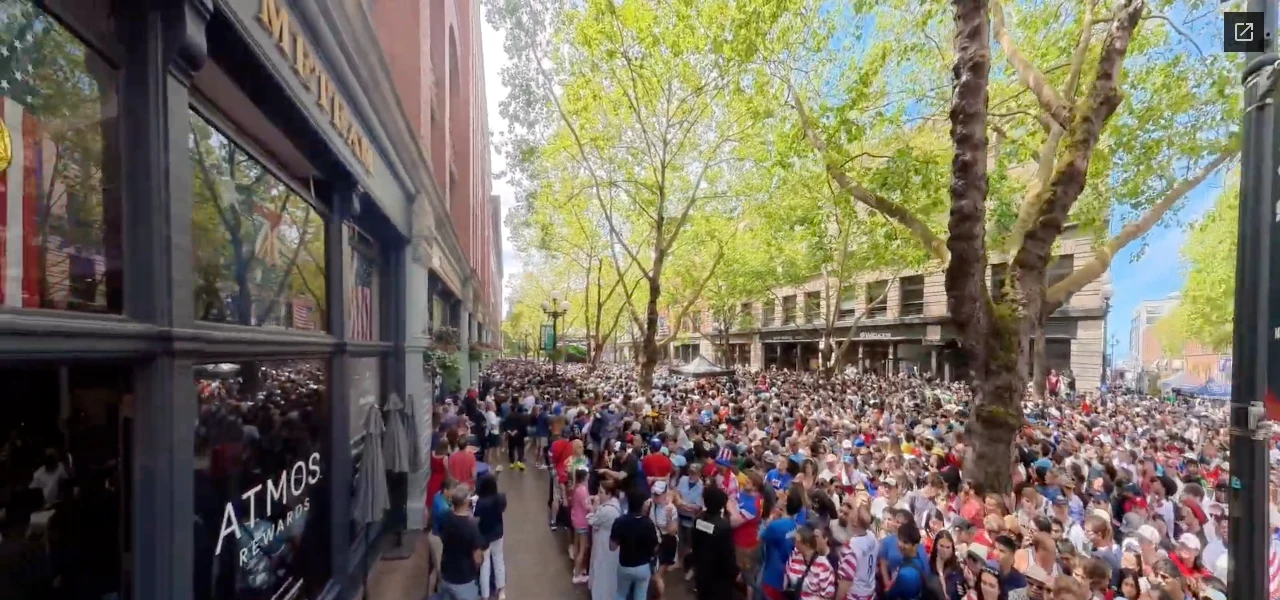
    Atmos Rewards sign on the left of HOMETEAM, with a crowd extending through the surrounding Seattle watch-party space.
    Watch-party atmosphere outside HOMETEAM, Seattle. Frame from the event video at 0:07. Creative and production: Studio Butch; venue: HOMETEAM.
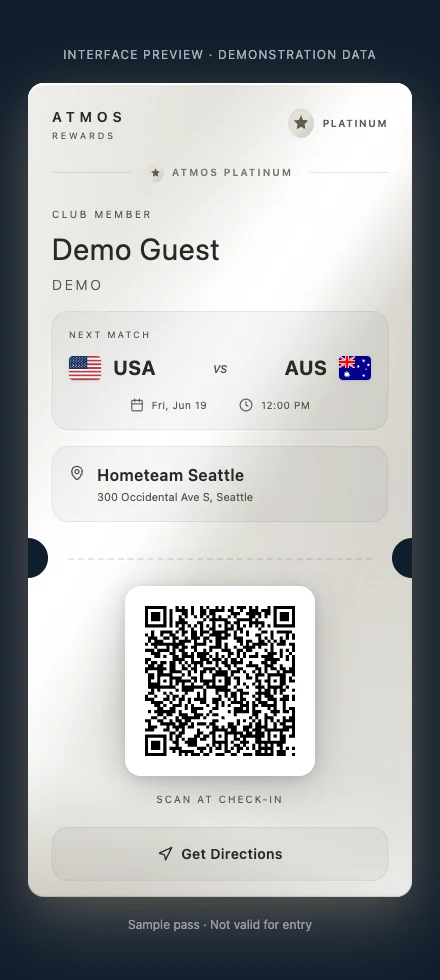
    Atmos Rewards Platinum guest pass showing Demo Guest, USA versus Australia, HOMETEAM Seattle and a demonstration check-in code.
    The app’s guest-pass interface, rendered with fictional demonstration data. This sample is inactive and contains no guest records.

    Experience and app evidence from the delivery case. Open either image for full size.

    What I built
    Mobile web platform for five 2026 World Cup watch parties in Seattle: guest passes, tier-based access and staff operations.
    What it proves
    I used AI-assisted development without a dedicated engineer and owned technology readiness, onsite support and live changes. Creative, production and venue work belonged to the wider team.
    Stage
    Delivered engagement
    Context
    Paid engagement
    Access
    Case study

    Evolution

    1. Digital check-in concept
    2. Operational stress testing
    3. Rehearsed fallback and reporting
    Read case
  3. F03

    Prototype

    Cadence

    Floorplan language · 2D editing · 3D spatial viewer

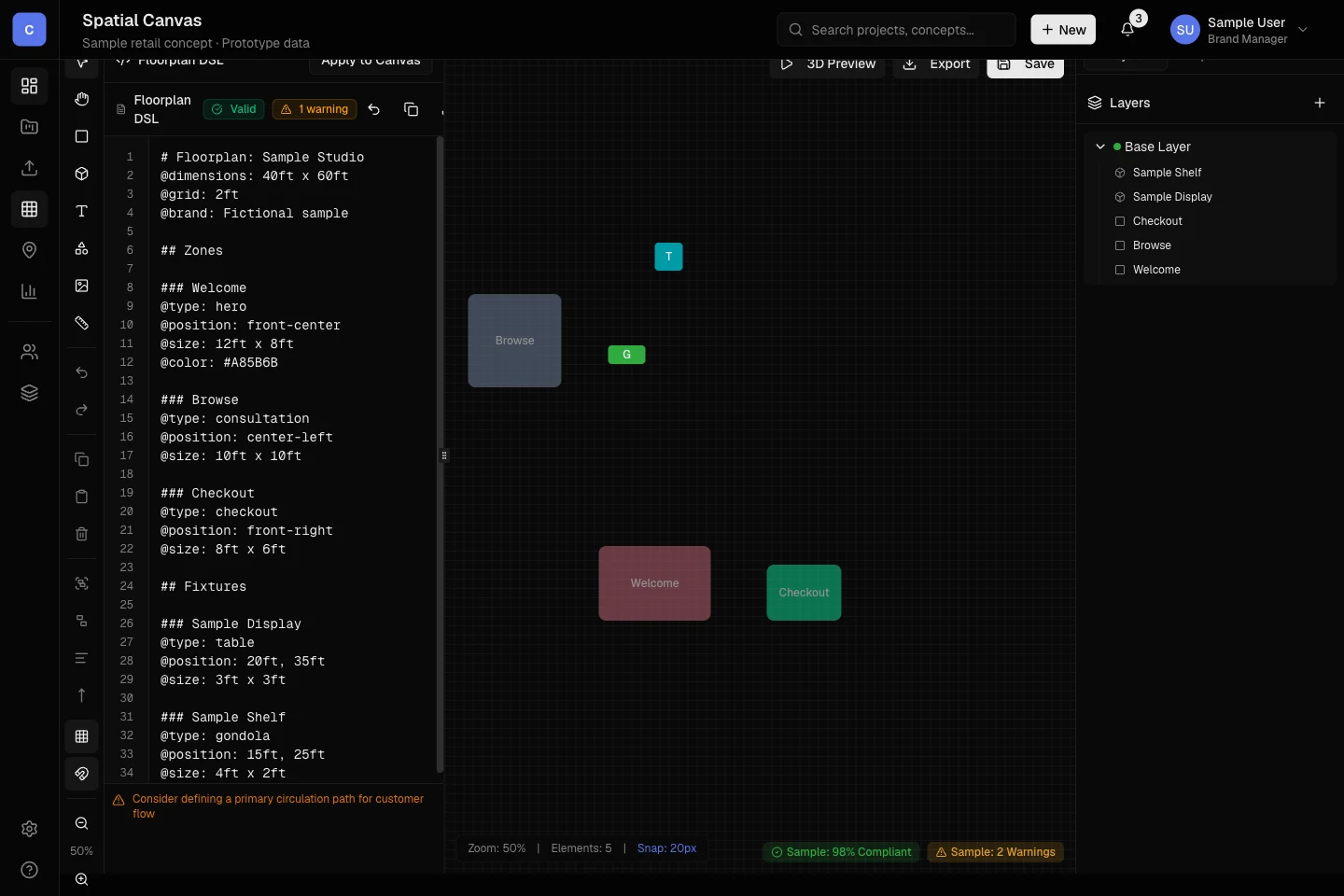
    Cadence prototype: a sample floorplan description beside the five spatial elements created by Apply to Canvas, with the matching Layers list.
    Cadence prototype — actual editor, sample data.
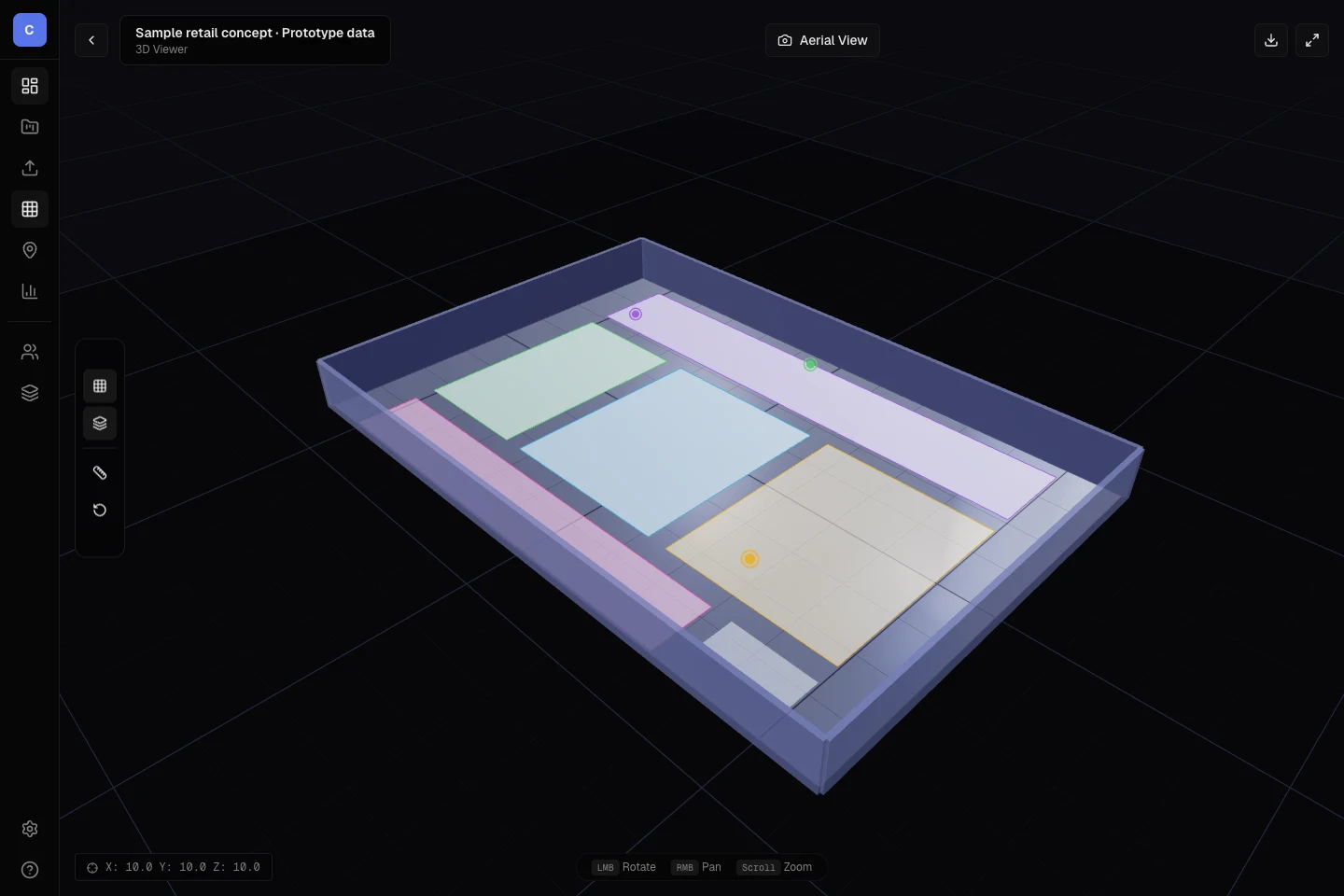
    Cadence 3D viewer showing an aerial view of a sample retail space with colored floor zones and surrounding walls.
    Separate 3D viewer — fixed sample layout, independent of the editor capture.

    Actual prototype screens with sample data. Open either image for full size. The viewer does not reflect edits made in the canvas; compliance badges in the editor are static examples.

    What I built
    A retail-planning prototype with a human-readable floorplan language, a 2D editor, and a separate 3D viewer. The captures show the actual editor updating from a sample plan and the viewer displaying its own fixed sample layout.
    What it proves
    The implemented editor makes spatial rules inspectable. The 3D viewer uses separate sample data; save, export, and the full AI workflow remain unfinished.
    Stage
    Prototype
    Context
    Independent work
    Access
    View prototype evidence

    Evolution

    1. Floorplan language
    2. 2D editor
    3. Separate 3D viewer
    View actual prototype evidence
  4. F04

    Prototype

    JobsPresence

    Enterprise workflow · geofencing · confidence engine

    Make uncertain attendance visible for review.

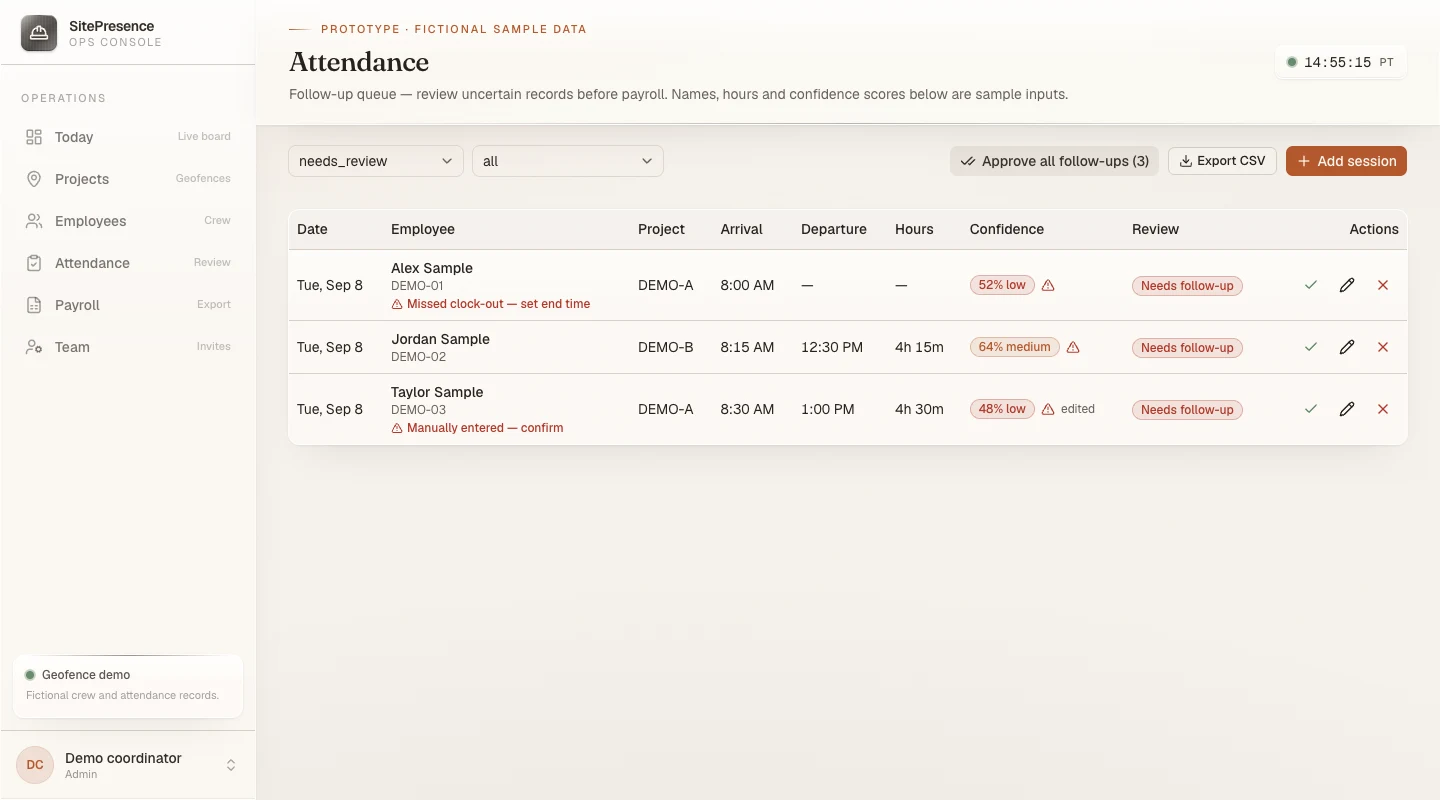
    SitePresence attendance interface with three fictional crew records, confidence badges, missing clock-out and manual-entry flags, and manager review controls.
    The actual attendance components, rendered with fictional crew, hours, and confidence scores. The app is branded SitePresence.

    Prototype UI with sample inputs. No real worker records, computed confidence results, approvals, or payroll delivery are demonstrated. Open the image for full size.

    What I built
    A workforce-presence prototype with geofenced attendance, a manager review queue, auditable corrections, and payroll exports. The current app is branded SitePresence and configured for one company.
    What it proves
    I designed uncertain attendance records to surface for review, alongside auditable edits and payroll exports. It is a prototype, with deployment and adoption still unproven.
    Stage
    Prototype
    Context
    Independent work
    Access
    By request
    Ask about this project

Inside the systems

Focused tools with a clear job.

Smaller tools for writing, AI infrastructure, and the operations behind customer experiences.

  1. T01

    Private system

    Humanizer

    Editorial systems · evidence · voice and judgment

    Under the hood

    “Remove sludge, not spine.”

    1. 01Kill the sludge

      Look for clusters of inflated language, generic praise, empty transitions, and clichés. Judge the pattern in context; one word is not automatically wrong.

    2. 02Restore human signals

      Ask: “Could this describe anyone?” Add a concrete anchor or cut the claim. Restore who did what, what mattered, and the writer’s judgment. Tighten the prose; let the thought set the rhythm.

    3. 03Protect the spine

      Keep the writer’s directness. Never invent specifics or optimize for AI-detector evasion. Make a clear choice instead of smoothing every opinion into neutrality.

    The editorial sequence
    1. Check that the prose is outward-facing, then identify its format.
    2. Remove weak language patterns and ground abstract claims in available evidence.
    3. Tighten ownership, judgment, and rhythm; critique the revision.
    4. Stop for human approval. The skill does not send or publish.

    Manual-assisted by design. Internal scratch work and chat are outside its default scope.

    Editorial design described by Brad. This explains the method; measured editing results have not been established here.

    What I built
    A manual-assisted editorial skill with three layers: remove weak language patterns, restore concrete human signals, and preserve the writer’s directness. It ends with self-critique and human approval.
    What it proves
    I made editorial judgment explicit: every claim needs a concrete anchor, every revision must preserve meaning, and the writer keeps the decision to publish.
    Stage
    Private system
    Context
    Independent work
    Access
    By request
    Ask about this project
  2. T02

    Prototype

    Personal AI Gateway

    Model routing · MCP and A2A · policy · testing

    Inside the control layer

    What happens when a model fails?

    1. 01 Request
    2. 02 Route + budget
    3. 03 Provider
    4. 04 Result + record

    Policy decision

    One fallback attempt

    Choose the allowed alternative once. The policy does not keep retrying an exhausted provider.

    Interactive explanation based on the prototype’s runtime-policy source. This changes the illustrated decision only; provider execution and service reliability are not demonstrated.

    What I built
    A shared control layer that routes model requests through budgets and runtime policy, records diagnostics, and connects agent and workspace tools.
    What it proves
    It makes model choice, cost, permissions, tools, and fallbacks part of product infrastructure instead of scattered implementation decisions.
    Stage
    Prototype
    Context
    Independent work
    Access
    By request
    Ask about this project
  3. T03

    Client-facing

    AWAY Winter Workshop

    Immersive 3D · luggage customization · games · postcards

    Customize, play, and create while you wait.

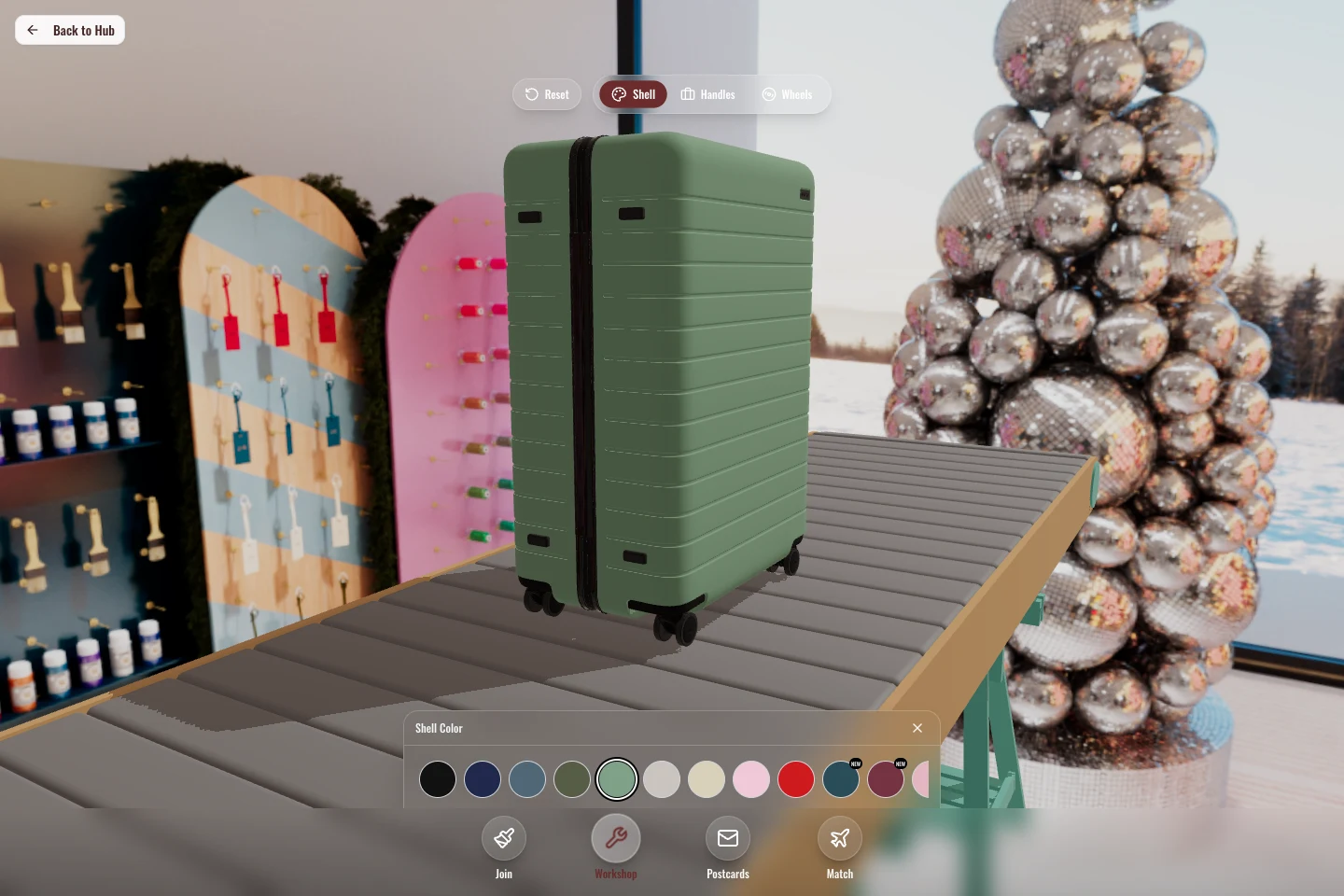
    Interactive AWAY luggage customizer showing a sage suitcase in a panoramic workshop setting, with shell, handle, wheel, and color controls.
    Make it your own3D luggage customization in the immersive workshop. Shell color and viewing angle changed through the app’s controls.
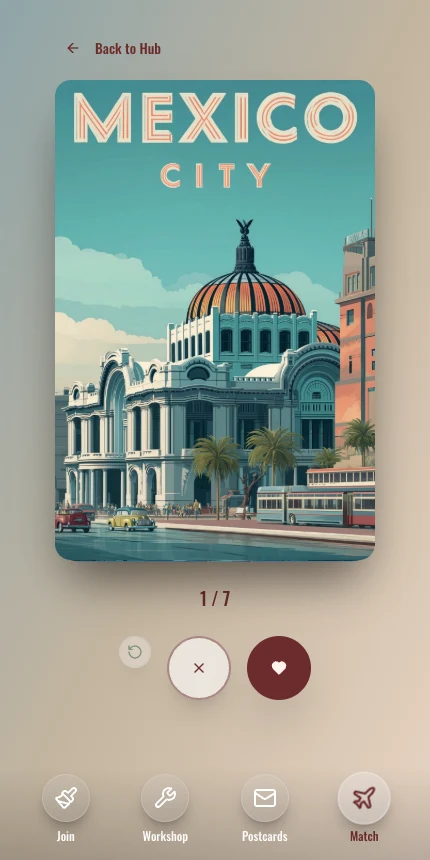
    WanderMatch mobile screen with an illustrated Mexico City destination card, skip and like controls, and progress through seven destinations.
    Play while you waitWanderMatch — swipe through destinations to discover where you want to go.
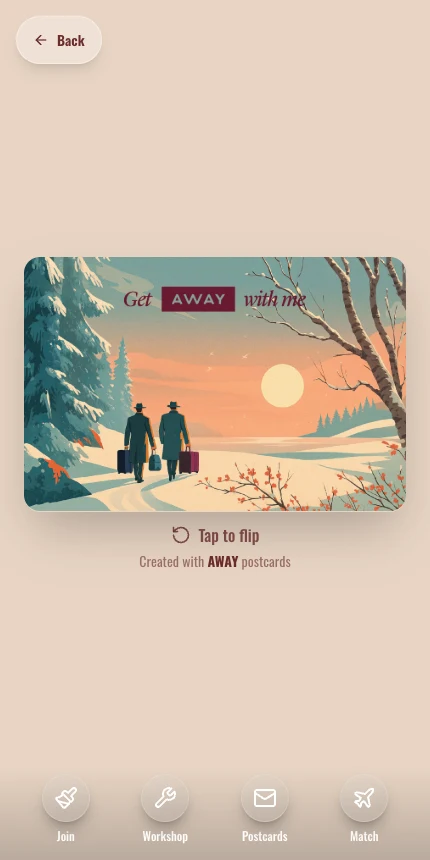
    AWAY digital postcard preview with two travelers in an illustrated winter landscape and a Tap to flip control.
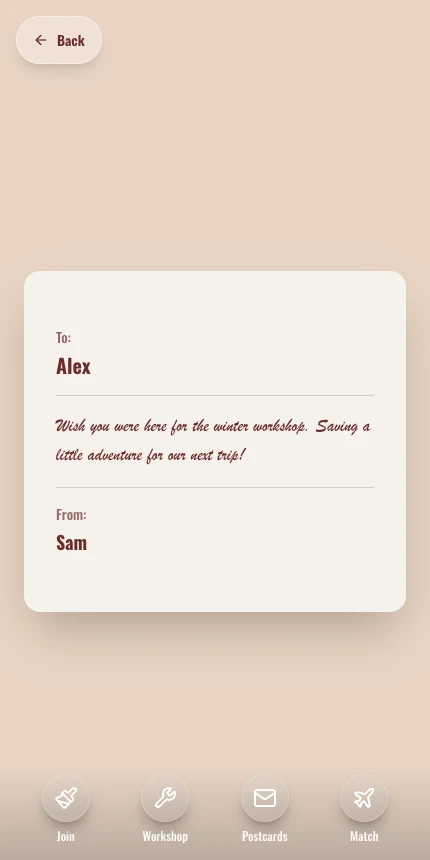
    Make a little keepsakeDigital postcards — choose an illustration, write a note, and preview both sides.
    See the postcard’s reverse with a sample message ↗

    Actual app screens, captured locally with sample data. Open any image for full size. Client-facing, unpaid work; these screens demonstrate the interface, not launch or guest adoption. Matching and postcard delivery were not exercised.

    What I built
    An immersive guest app for AWAY Winter Workshop: customize luggage in 3D, explore the space, play WanderMatch, and make a digital postcard while waiting. Queue, notification, and admin tools support the visit.
    What it proves
    I treated waiting as part of the guest journey: a chance to explore, play, and personalize before reaching the customization station.
    Stage
    Client-facing concept
    Context
    Client-facing, unpaid
    Access
    By request
    Ask about this project
  4. T04

    Prototype

    Giselle

    RAG · vector search · MCP · geospatial data

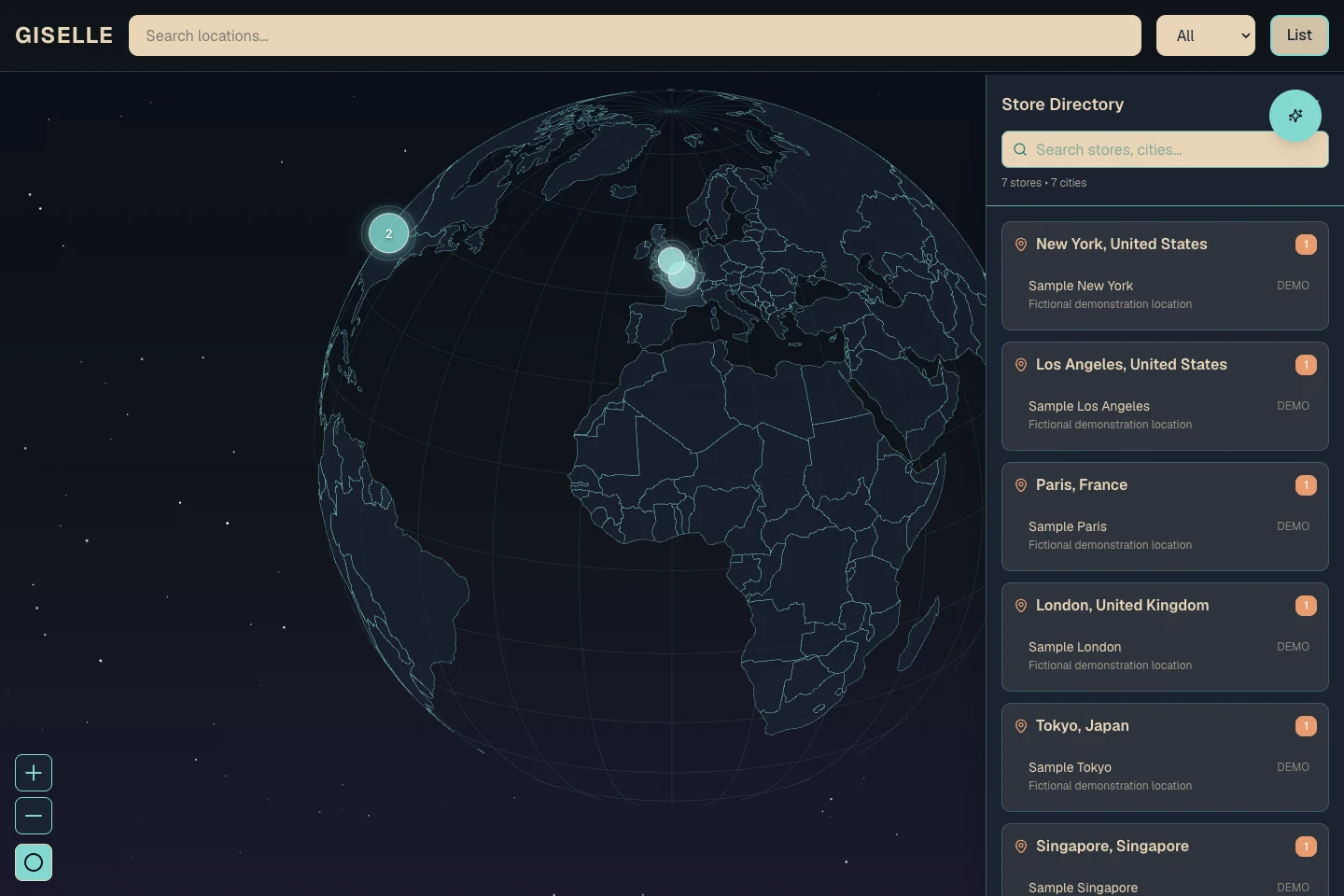
    Start with the store and its place in the network.

    Giselle interactive globe beside its store directory, showing seven fictional sample locations across cities including New York, Paris, and Tokyo.
    Actual globe and store directory, running locally with seven fictional locations. No company store records or generated assistant answers are shown.

    The capture demonstrates the globe and directory interface. Retrieval quality, model responses, and deployment are untested here. Open the image for full size.

    What I built
    A retail knowledge prototype with a navigable store globe, a location directory, and an assistant connected to document search and spatial tools.
    What it proves
    It explores how an assistant can make operating knowledge useful without losing the permissions, source boundaries, and location context behind an answer.
    Stage
    Prototype
    Context
    Independent work
    Access
    By request
    Ask about this project

Version trails

The decision between versions is the artifact.

Early concepts, pivotal changes, and benched approaches often reveal more product judgment than another polished final screen.

  1. V01

    Prototype

    Lake Powell: prototype to digital twin

    Three.js · React Three Fiber · terrain data

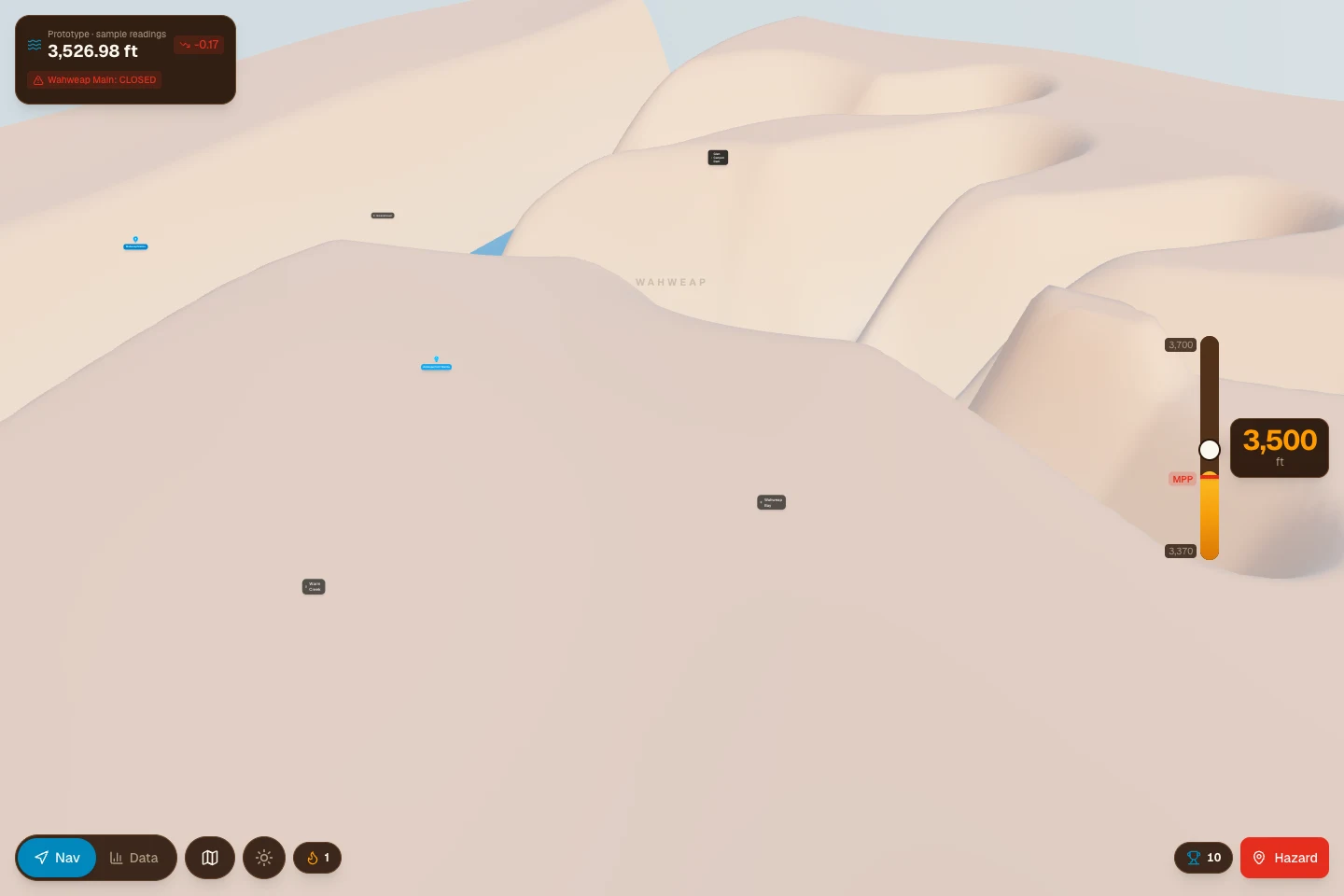
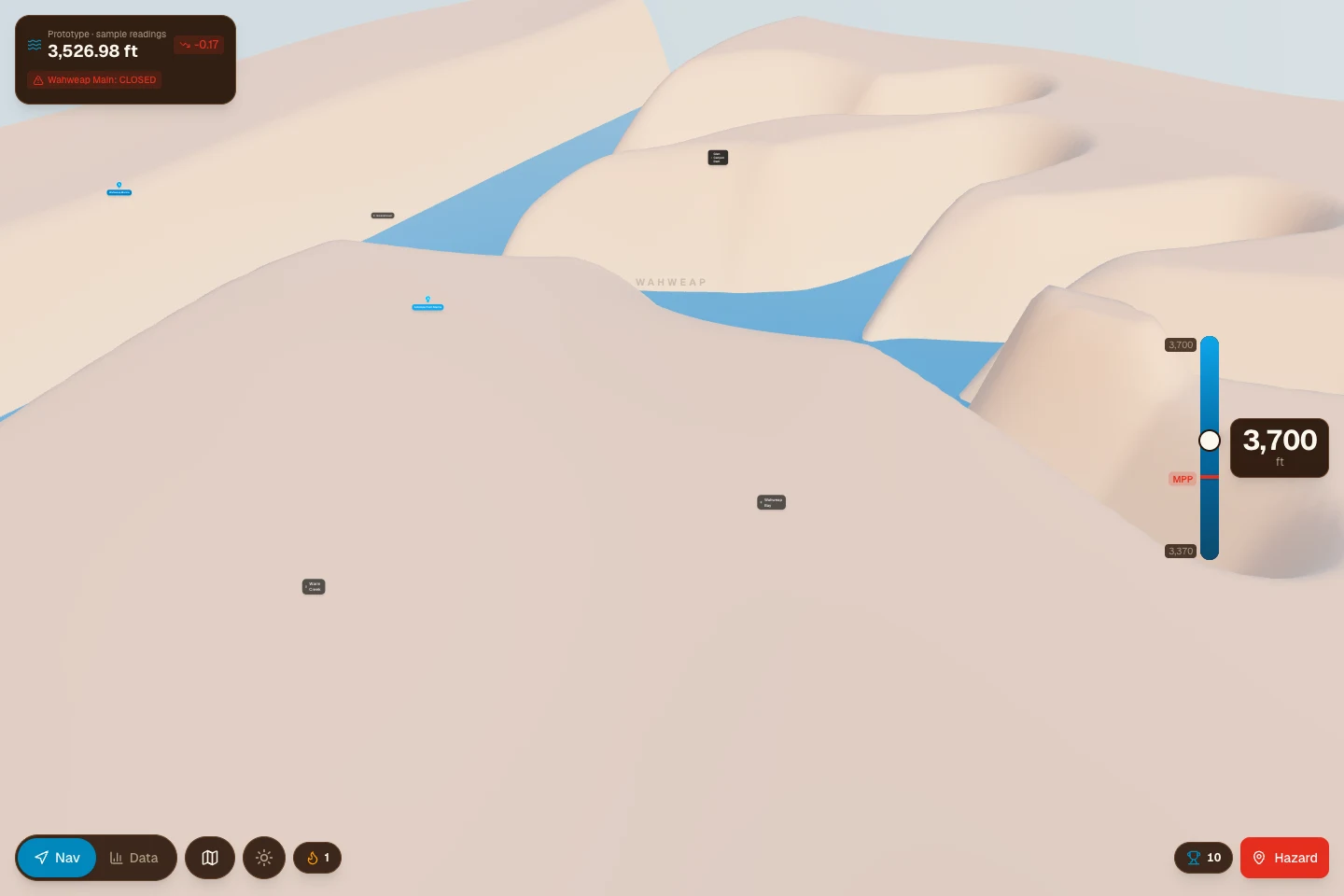
    Change the water level. Compare the visible extent.

    Lake Powell prototype showing its procedural terrain at a sample water setting of 3,500 feet, with a narrow visible blue water area.
    3,500 ft — sample setting in the prototype’s procedural terrain mode.
    The same Lake Powell prototype view after the native slider is raised to 3,700 feet, exposing a wider blue water area between the terrain forms.
    3,700 ft — same view after changing the app’s water-level slider.

    Actual app screenshots using its procedural fallback terrain. The two slider settings are scenarios; the readings and ramp status at top left are fixed sample values. Geographic accuracy and live lake conditions are not established. Open either image for full size.

    What I built
    A compact 3D visualization that grew into terrain, elevation, water-extent, DEM-processing, and shared-state work.
    What it proves
    A water-level slider makes scenario changes visible. The captures use procedural fallback terrain; the terrain-data pipeline and geographic accuracy need further validation.
    Stage
    Prototype
    Context
    Independent work
    Access
    By request

    Evolution

    1. POWELLSYNC visual prototype
    2. Terrain and elevation model
    3. Water scenarios and shared state
    Ask about this project
  2. V02

    Benched prototype

    Rotating-QR check-in

    Web · cryptography

    A code with a time window

    Benched before live use

    30sRefresh interval

    60sMaximum token age

    0s30s60s90s
    Code A0–60s
    Code B30–90s
    Refreshing the display leaves an overlapping age window. The source also validates the timestamp and the signature over the session token and timestamp.

    The product decision was to bench this approach before live use. The deployed pass used a static code.

    Explanatory diagram from the benched helper. No live QR payload is generated; this is not a security assessment.

    What I built
    Signed, time-limited session tokens displayed as a rotating QR code for check-in.
    What it proves
    A sound technical idea can still be the wrong operational choice. This prototype was evaluated and benched before live use.
    Stage
    Benched prototype
    Context
    Independent work
    Access
    By request
    Ask about this project